
Talking to Yuki
Ask about your plans, add anything by saying it, and see what Yuki did in Activity.
By YukiPublished Updated
Yuki’s Chat is not a blank chatbot: Yuki knows your calendar, trips, spending and groups, so it answers from your life. Ask about your plans or add something by saying it; before it changes anything, it shows an approval card, and Activity lists what it did. Chat is a tab on your phone and “Chat with Yuki” on the web.
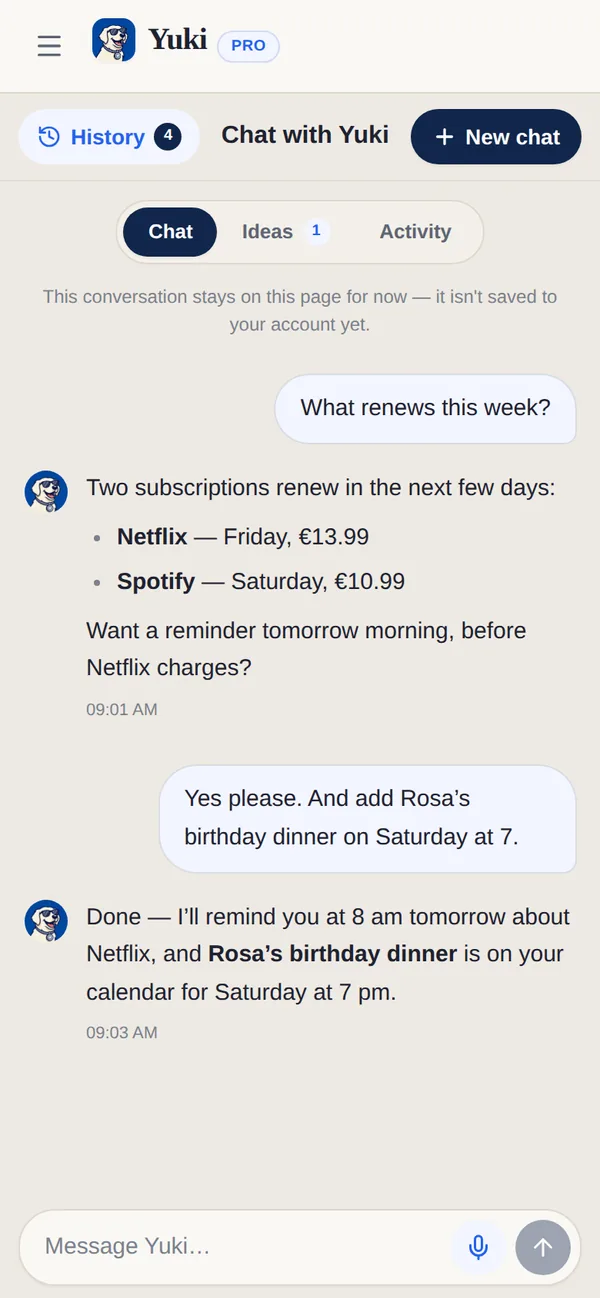
What can I ask Yuki?
Ask Yuki about your own plans, add something by saying it, or ask about money and your groups. Yuki answers from your calendar, trips, spending and groups. Three things to try first:
- 1Ask about today — “what’s on my agenda?” or “what’s due this week?”
- 2Add something by saying it — “dinner with Sam Friday 7pm”, “electricity bill €60 on the 28th”.
- 3Ask about money or a group — “what did I spend last week?”, “who owes what in the flat?”
Writing a longer message
The message box grows as you type, up to six lines, then scrolls. On the web, Enter sends and Shift+Enter starts a new line. The microphone lets you dictate instead.
Can I talk to Yuki instead of typing?
Yes. To talk instead of type, open Voice mode — the “Talk to Yuki — voice mode” button next to the message box on the web, where your browser supports it. Speak to Yuki, click to interrupt, or choose Type instead.
Chat, Ideas and Activity
| Segment | What it is for |
|---|---|
| Chat | Ask, add and get things done. |
| Ideas | Things Yuki noticed it could do for you, each starting “I can …”. Tap Do it, or Not now. |
| Activity | Everything Yuki has done for you, by day, and anything waiting for your OK. Most things can be undone for 30 days. |
What does Yuki remember about me?
Yuki only remembers things you told it yourself — never things inferred from reading your mail. Everything it holds is listed under What Yuki remembers (Settings → Yuki on the web, Profile → Yuki on the phone). Forget anything, any time — or just ask Yuki to forget it.
Which languages does Yuki understand?
Yuki understands and answers in any language. Ask in your own words, the way you would ask a person; there are no special commands to learn.
How many prompts does each plan include?
Free includes 20 Yuki AI prompts a month; Pro includes 100. Pro is not unlimited AI.
| Capability | Free | Pro |
|---|---|---|
| Yuki AI prompts (across the app) | 20 / month | 100 / month |
Can I keep separate conversations with Yuki?
Yes. Tap New chat to start a fresh conversation; Yuki keeps each one apart. History lists every conversation with its last message and when it was. You can rename a chat, or leave the name empty and Yuki names it from your first message. You can also delete a chat, or archive one on your phone, and once the list is long a Search chats box appears. Your main chat with Yuki can be renamed but not deleted.
Can I send Yuki a photo or a PDF?
On your phone, yes. Tap the paperclip and choose Take a photo, Choose a photo or Choose a PDF. You can send up to 3 files with a message, each up to 10 MB, and Yuki reads them together with what you write.
Can I stop Yuki mid-answer?
Yes. While Yuki is working, Stop replaces the send button on your phone; on the web there is a Stop button under the message box. On your phone the reply appears as it is written, and afterwards Yuki may suggest up to three follow-ups to tap.
How do I tell Yuki a reply was good or bad?
Tap Good reply or Not helpful under the answer. After Not helpful, Yuki asks What went wrong?; answer it or tap Skip.
How do I know what Yuki is doing while I wait?
A short line shows the step it’s on, such as Checking your agenda…, Looking through your tasks… or Reading your lists…. If an answer is slow, it reads Taking longer than usual… trying another route while Yuki tries another way.
Can Yuki write emails that sound like me?
Yes, on Pro with Gmail connected. Tap Learn my writing style: Settings → Yuki on the web, or Profile → Connections under Gmail on your phone. Yuki reads up to 12 emails you sent in the last year, once, and keeps only a short description of how you write, which you can read in full. It needs at least three sent emails. Clear sends drafts back to Yuki’s default voice, and you can learn it again up to 5 times a day.
Sources
Official documentation, standards and research behind the facts on this page.
- Web Speech API (W3C Community Group specification) (opens in a new tab) — The browser speech interface voice mode relies on, which is why it works where your browser supports it.
- Choose Gmail API scopes (Google for Developers) (opens in a new tab) — Read-only Gmail access, the kind Learn my writing style uses to read a few emails you sent.
- Google API Services User Data Policy (opens in a new tab) — Google’s limits on how apps may use the Gmail data they read.