
Polls
Find a date that works or settle a decision — share a link, or ask one of your groups.
By YukiPublished Updated
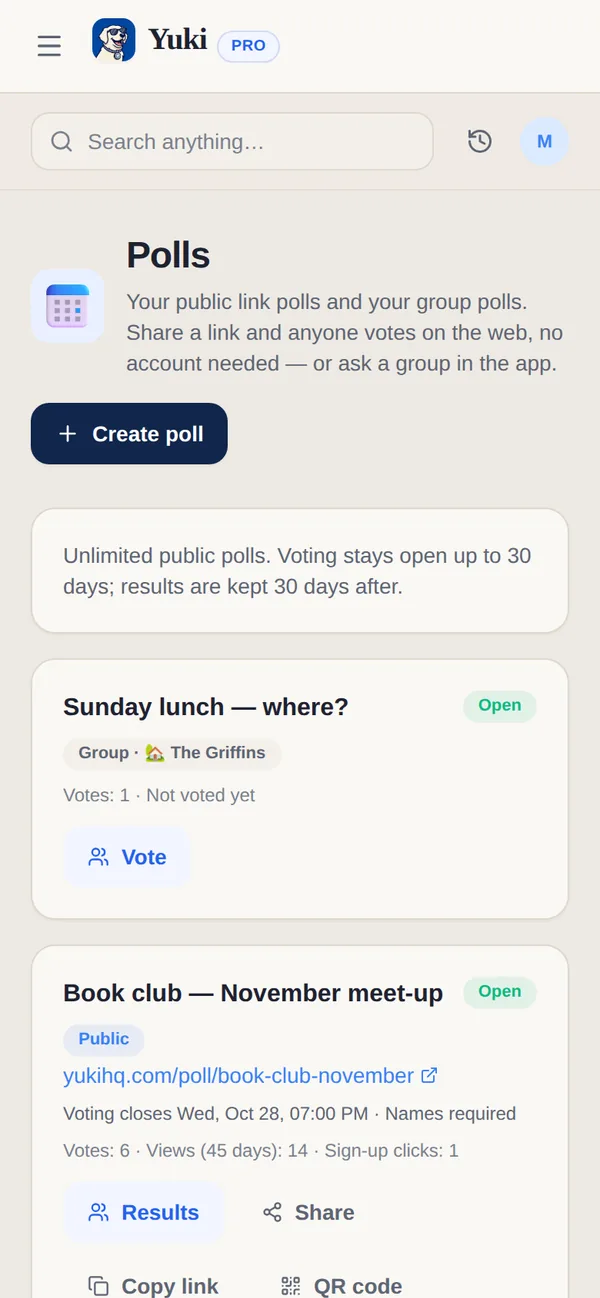
Yuki polls settle the questions a group chat never does: which evening, which restaurant, who brings what. Anyone can answer a public link poll in their browser, with no account. A group poll lives in one of your Yuki groups, and its members vote in the app. You create both kinds from Polls.
How do I create a poll?
Open Polls and tap Create poll. Choose a public link or one of your groups, add your questions, then share the link.
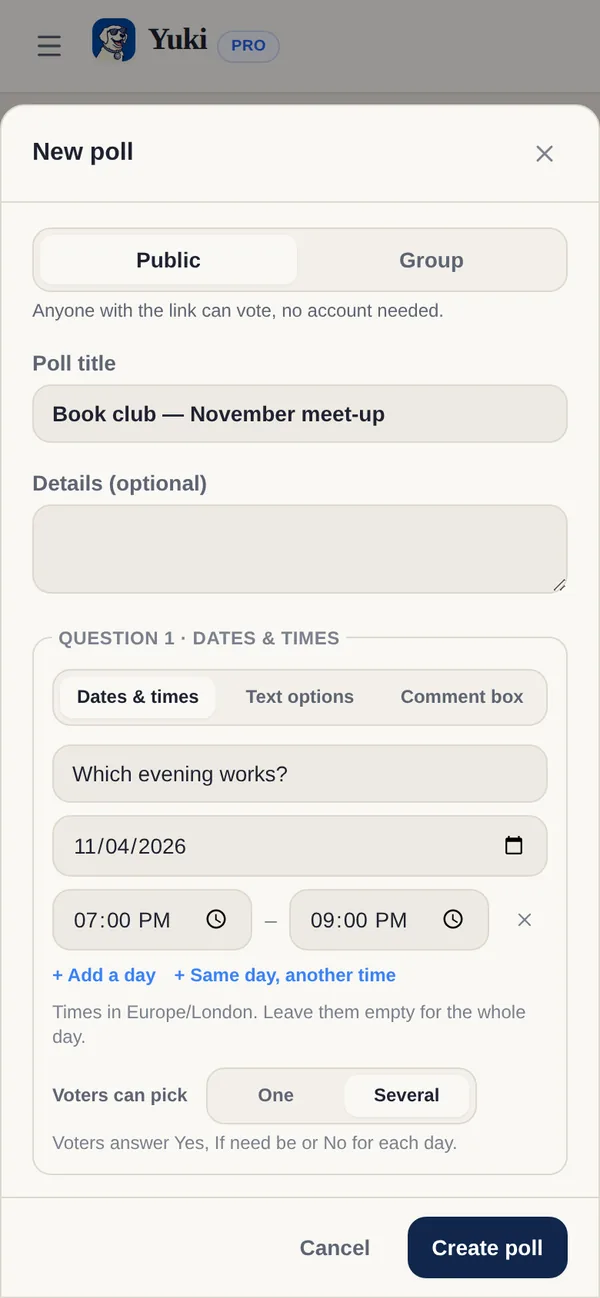
- 1Open Polls — a card in All features on web Home, or from your profile on the phone — and tap Create poll. (Poll in Create new starts one too.)
- 2Choose Public link poll — anyone with the link can vote, no account needed — or one of your groups — only its members can vote, on the web or in the app.
- 3Give it a title, then add your questions: Dates & times, Text options or a Comment box.
- 4For each question, set Voters can pick: One or Several.
- 5Choose names required or anonymous, when results show and when voting closes, then tap Create poll and share the link.
What can a poll ask?
A poll can ask for dates and times, a choice between text options, or a free-text comment, in any mix.
- Dates & times — add days, with or without times. With Several, voters answer Yes, If need be or No for each day; with One, they choose one day.
- Text options — where to go, what to bring. Voters pick one, or several if you allow it.
- Comment box — a free-text answer, for anything else.
How long does a poll stay open?
A poll stays open until the closing date you pick, from tomorrow up to 30 days ahead, and you can close it early. Its results stay readable for 30 days after it closes.
- Voting — Names required or Anonymous.
- Show results — Always, After voting, or When voting closes.
- Voting closes — from tomorrow up to 30 days ahead; close it early any time. People can change their vote until then.
- Afterwards — results stay readable for 30 days after voting closes; then the poll and its votes are deleted.
| Capability | Free | Pro |
|---|---|---|
| Public link polls open at once | Up to 3 | No limit |
| How long voting can stay open | Up to 30 days | Up to 30 days |
| Group polls in your Yuki groups | Included | Included |
Do people need a Yuki account to vote?
No, not for a public poll: anyone with its link votes in their browser, without an account. A group poll is different. Only the members of that Yuki group can vote in it, on the web or in the app.
What can I do with a poll after I share it?
On the web, open the poll to see the results and who voted. From there you can Copy link, show a QR code, Edit it, Close voting or Delete it; deleting removes all votes and can’t be undone. With named voting you can remove a single vote. When a date question has a clear favourite, Add winning option to calendar turns it into an event.
Can I reopen a poll that has closed?
Yes, while its results are still readable, which is 30 days after it closes. Edit the poll and pick a new closing time, and voting opens again. The closing times to choose from are Tomorrow, In 3 days, In a week, In 2 weeks and In 30 days.
Will I know when people vote?
Yes. Yuki sends you a push when new votes come in on your public poll, at most one every 10 minutes rather than one for every vote.
Is there a limit on votes?
A public poll takes up to 500 votes, with at most 15 from one network, so one person can’t vote many times.
What does voting look like for the people I ask?
The poll page opens in the voter’s browser language, and they can switch it. Times are shown in the poll’s time zone, with the voter’s own time underneath when theirs is different. A date question set to Several has a Yes to all button, and in the results the leading answer is marked Top pick.
Can someone change their vote on another device?
Yes. Their browser remembers the vote, so Change my vote works there until voting closes. After voting, the page also gives them a private edit link to use on another device.
How big can a poll be?
A public poll can have up to 10 questions. A text question takes up to 30 options, a date question up to 40 days or times, and a comment answer up to 1,000 characters.
Sources
Official documentation, standards and research behind the facts on this page.
- Time Zone Database (IANA) (opens in a new tab) — The time zone data devices use to show a poll’s times in the poll’s time zone and in the voter’s own.
- QRcode.com (DENSO WAVE, inventor of the QR code) (opens in a new tab) — How QR codes work; a poll’s link can be shown as one.
- General Data Protection Regulation (EU) 2016/679 (EUR-Lex) (opens in a new tab) — The EU law on personal data such as voters’ names and votes, which covers poll data stored in the EU.