
Booking links
Share one link and let people pick a time that suits you both — no Yuki account needed.
By YukiPublished Updated
A Yuki booking link is a web page where other people book time with you, without a Yuki account. You set when you are available, they pick a time that suits them, and the booking lands in your Yuki calendar. You make and share booking links from Calendar, under Booking link in its header.
How do I create a booking link?
Open Calendar, tap Booking link in the header and then New booking link. Name it, set its length and your hours, and share the link Yuki gives you.
- 1Open Calendar and tap Booking link in the header. On the web, Booking links is also a card in All features on Home, and Booking link is in New.
- 2Tap New booking link and give it a name and a length, such as a 30-minute intro call.
- 3Choose where booked events go (Yuki calendar, and Google Calendar on Pro) and where you meet (Phone, In person, Video link, or Google Meet when bookings go to Google Calendar).
- 4Set the days and hours you are available, in your own time zone, then any breaks before or after, the minimum notice, how far ahead people can book, a daily maximum and when the link expires.
- 5Tap Create link, then copy or share the link.
What does the person booking see?
- Only your free times — never what’s in your calendar — shown in their own time zone.
- Pick a day, pick a time, then their email and, if they like, a name and a note. Confirm booking and they get a calendar invite.
- A link to change or cancel the booking later, with no account and no login.
Which of my times count as busy?
- Your events in Yuki, and your Google Calendar’s busy times if it’s connected.
- Timed tasks and reminders — “Count my timed tasks as busy” is on unless you switch it off. All-day, done and won’t-do tasks don’t count.
- Your other bookings. A time that’s been taken is no longer offered, and a cancelled booking frees its slot again.
Managing links and bookings
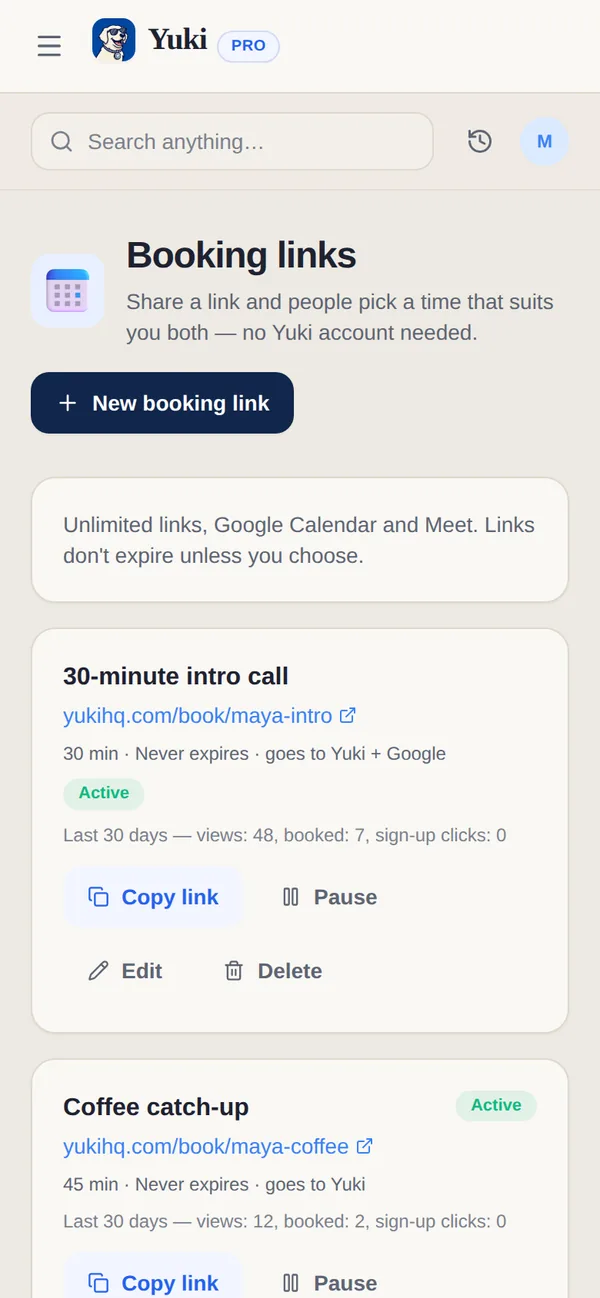
Each link shows its address, whether it’s Active, Paused or Expired, and its views and bookings over the last 30 days. Copy link, Pause or Turn on, Renew, Edit or Delete it from its card. Upcoming bookings are listed underneath; Cancel booking frees the time. When the booking was added to Google Calendar, Google emails the person; otherwise Yuki tells you to let them know.
| Capability | Free | Pro |
|---|---|---|
| Active booking links | 1 | No limit |
| Where bookings go | Yuki calendar | Yuki calendar and Google Calendar |
| Google Meet for bookings | — | Included |
| Link expiry | After 7 days (renew any time) | Doesn't expire unless you choose |
Can the person who booked change or cancel?
Yes. Either of you can cancel, and the person who booked can change the time from the link in their confirmation, with no account and no login. A cancelled booking frees its slot again.
Are booking links free?
Yes, on Free you get 1 active booking link. It expires after 7 days, and you can renew it any time. Pro has no limit on links, keeps a link until you choose to end it, and can put bookings in Google Calendar with Google Meet.
What can I set on a booking link?
- Length: 15, 30, 45, 60 or 90 minutes, and an optional description.
- A break before or after: none, 5, 10, 15 or 30 minutes.
- Minimum notice: none, 1, 4, 24 or 48 hours.
- How far ahead people can book: 7 to 90 days.
- Max bookings a day: 1 to 8, or no limit.
- Your own link address, yukihq.com/book/your-name.
For a phone meeting, your number is shown only after someone books.
Will I know when someone books?
Yes. Yuki sends you a push when someone books, moves a booking or cancels one, with their name and the time. One email address can hold at most 3 open bookings on the same link.
What does the booking page look like for them?
It opens in their browser’s language, and they can switch it. Days with free times are marked on a month view, and a day’s times are grouped into Morning, Afternoon and Evening. Times show in their own time zone, which they can change, with yours named.
What happens after they book?
They see You’re booked, with Add to calendar and a Change or cancel link to keep. Their invite is written in their language. That link keeps working until the meeting starts, even if your booking link has expired since.
What if my link has expired or is switched off?
The page says This link has expired or This link isn’t available and asks them to get a new one from you. It never shows your times.
Sources
Official documentation, standards and research behind the facts on this page.
- Freebusy: query (Google Calendar API reference) (opens in a new tab) — Reads busy times from Google Calendar without the events’ details, so a booking page can offer only your free times.
- Create events (Google Calendar API guide) (opens in a new tab) — How an event is added to Google Calendar with guests and a Google Meet link, as bookings are on Pro.
- RFC 5545: Internet Calendaring and Scheduling Core Object Specification (iCalendar) (opens in a new tab) — The calendar format behind invites and Add to calendar, which work in any calendar app.
- Time Zone Database (IANA) (opens in a new tab) — The time zone data devices use to convert times between zones, as the booking page does for the person booking.