
Groups
Shared plans, costs, lists and polls — for the people you actually share life with.
By YukiPublished Updated
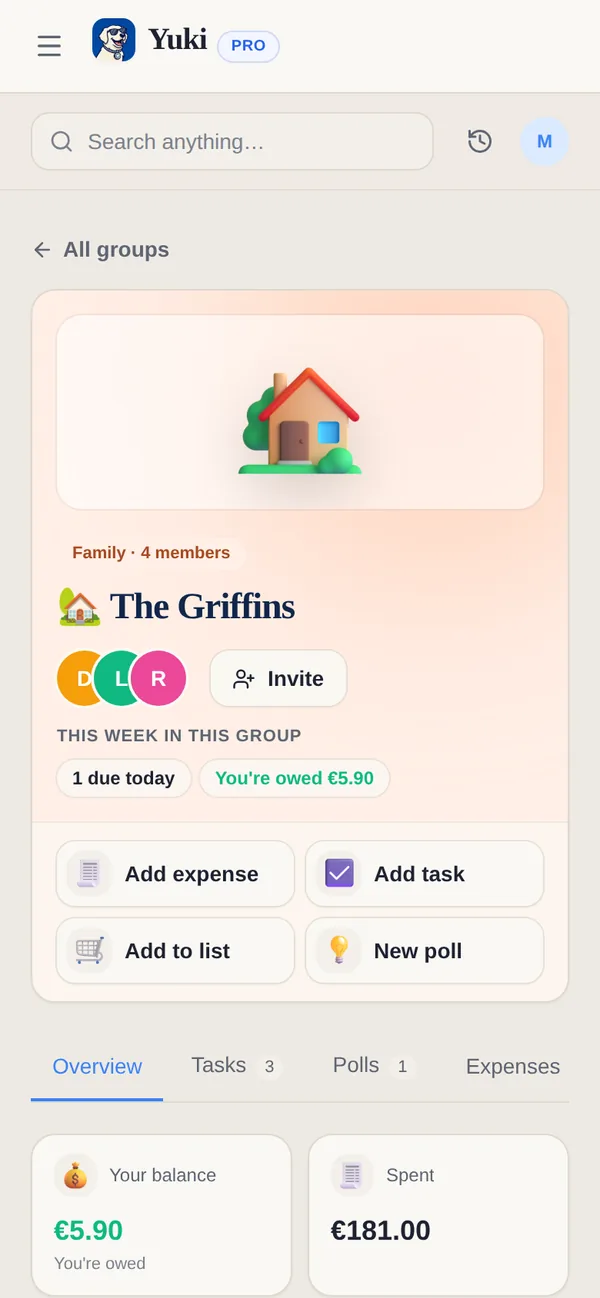
A group in Yuki is a shared space for the people a part of your life involves, such as your family, a partner, flatmates or a trip. Members share plans, costs, lists and polls. There are nine kinds, and choosing one sets up the right tools and starter tasks, so a co-parenting group does not open with a grocery list.
What kinds of group can I make?
Yuki has nine kinds of group: Family · Couple · Co-parenting · Flatmates · Friends · Fitness & habit challenge · Trip · Family Retirement Plan · Custom. Choosing the kind preconfigures the tools and the starter tasks, so a co-parenting group does not open with a grocery list.
What can a group share?
A group can share expenses, tasks and chores, groceries, polls and a calendar.
- Expenses — split equally, by exact amounts or percentages, or paid by one person, with a running balance and settle-up. Mark as paid records a payment in Yuki; no money moves.
- Tasks & chores — assigned and visible to everyone. Group tasks show on your Home and Calendar, and any member can tick one off there.
- Groceries — one list everyone adds to; whoever is shopping sees the full list live.
- Polls — for the decisions nobody wants to chase. See Polls.
- A shared calendar — what is happening, and who is free; share your own calendar with the group if you choose.
How do I create a group?
- 1Open Groups — from Home on your phone, or Groups in the web sidebar — and tap New group, then Create a group (or Start from a Life Setup, or Join a group with a code or link).
- 2Name it and pick the kind — family, flatmates, a trip, and so on.
- 3Choose which tools to switch on; Yuki suggests a sensible set and some starter tasks for the kind you picked.
- 4Invite people with a link or code.
Can people in my group see my private items?
No. Everyone keeps their own account and their own private items. Only what you share into the group is visible to the group, and your inbox is never shared.
Is sharing free?
Yes. Free includes up to 5 groups with up to 2 people in each, and you can add 1 new shared expense a day in a group. Pro has unlimited groups and group members, and no daily limit on shared expenses. Paying for a plan never gives anyone access to someone else’s private data.
Does everyone in a group need a Yuki account?
Yes. Each person has their own Yuki account with their own connected email and private data, and joins the group with its link or code.
What happens when I leave a group?
Open the group’s Members screen and tap Leave Group. You lose access to the group, and open tasks assigned to you become unassigned. If you owe money in the group, or are owed, Yuki warns you to settle up first. If you are the last member, leaving deletes the group. Delete Group is offered only to the person who created the group, and deletes it for everyone, with its tasks, events and grocery lists.
Who can remove people from a group?
Only a group admin can remove a member or set the group’s currency. Someone an admin removed can’t rejoin with the group’s invite code; they can only come back if someone in the group invites them again. A member can’t make themselves an admin.
Does joining someone’s group count toward Free’s 5 groups?
No. Free counts the groups you created and haven’t deleted. Groups you join don’t count, and deleting one of yours frees a place. Free groups have up to 2 people each; Pro removes both limits.
Do other members see my calendar?
Only if you choose. On the group’s Members screen, Share my calendar is off until you turn it on; then other members see your events on the group’s Calendar tab. Share all event types, or pick from Events, Meetings, Birthdays, Anniversaries, Occasions and Groceries. You can also share a single event from Calendar without sharing the rest.
What are group Stats and the Challenge?
Stats shows the group’s shared effort: completed tasks over 7 days, 31 days or 12 months, who paid and the net spent after paybacks, and tasks by category. An optional Leaderboard style changes the view for everyone. In a Fitness & habit challenge group, Challenge is a shared journal: tap Log today and post a photo or a line, and each member scores one point for each day they post, with a streak and standings. Every group also keeps an Activity log of what members did.
Sources
Official documentation, standards and research behind the facts on this page.
- Verhoeff, T. (2004), “Settling Multiple Debts Efficiently: An Invitation to Computing Science”, Informatics in Education (opens in a new tab) — How a group’s debts can be cleared with as few payments as possible, the aim of settle-up.
- ISO 4217 currency codes (SIX, the ISO 4217 maintenance agency) (opens in a new tab) — The official currency codes behind the currency a group admin sets.