
People, birthdays & anniversaries
The people in your life and their dates: birthdays, anniversaries and the moment to say something.
By YukiPublished Updated
Yuki’s People keeps the birthdays, anniversaries and other dates that matter about the people in your life, and reminds you in time to reach out. Upcoming dates show how many days away they are. People is in the web sidebar and in Home’s Quick links; on your phone, it is under Profile and among Home’s shortcuts.
What is in People?
People lists the important dates of the people in your life and everyone you’ve added.
- All, Birthdays, Anniversaries and Other — what is coming up, this month and later.
- Favorites — tap the heart on someone to keep them at the top.
- Your people — everyone you’ve added, grouped.
How do I add a birthday or anniversary?
Each date you save is an occasion. Tap Add occasion in People, or add one from anywhere in the app:
- 1Tap + (New on the web) and choose Occasion.
- 2Pick the type — Birthday, Anniversary or Other — and whose it is.
- 3Set the date. It repeats every year on your calendar.
Dates synced from your contacts show up in People too.
Is the person told when I add their birthday?
No. A date you add, or one from your address book, is marked Only you: it is private to you, and the person it is about isn’t told.
When does Yuki remind me?
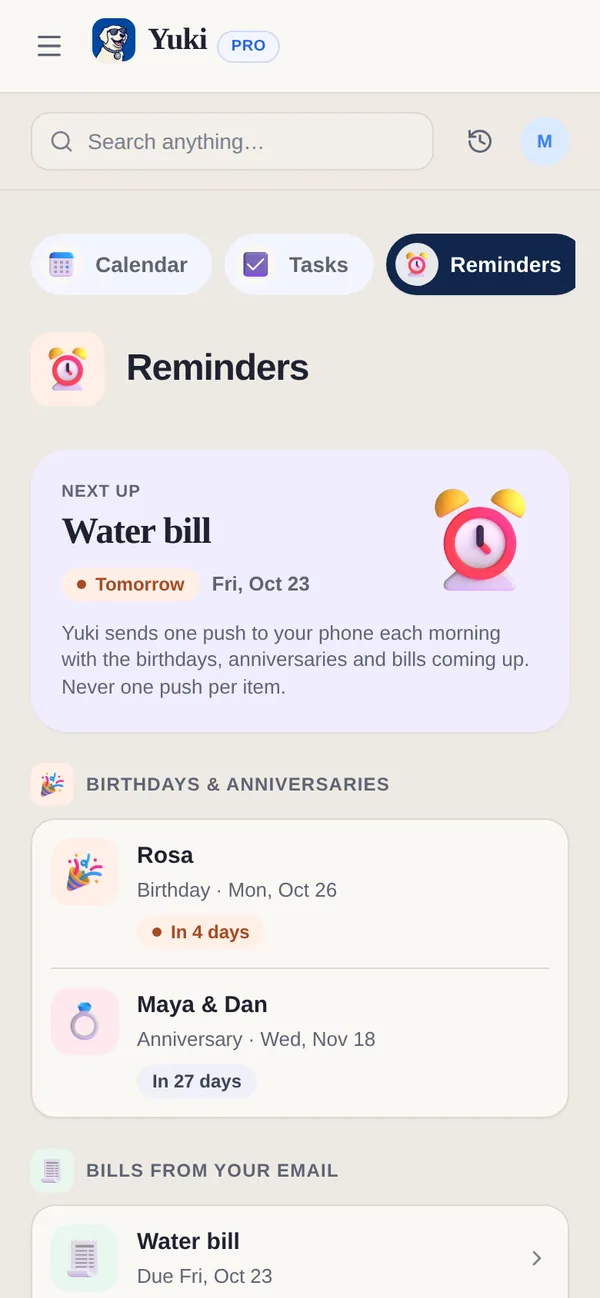
Yuki reminds you of a birthday or anniversary two weeks ahead and again on the day. The reminder comes in one push each morning with everything coming up, including bills from your email, never one push per item. On the web, the same list is Calendar → Reminders.
Can Yuki help me send the wishes?
Yes. On the day, the occasion on your phone offers a ready message — edit it if you like — and sends it by WhatsApp, Message, Telegram or email.
Are birthday reminders free?
Yes. Birthday and anniversary reminders are on Free; Pro adds reminders for tasks and events, including recurring ones. Adding an occasion counts toward Free’s shared 10 items a day.
How do I add someone who is already on Yuki?
Open People and tap Find people. Search By username, or tap Find my people to check which of your synced contacts are already on Yuki. Each result says why it appeared, such as In your contacts or Exact username match. Tap Add to put them in your People. That is all it does: they get no access to your data and no message. Lookups are limited each day, so a very large search may ask you to try again tomorrow.
What can I keep about a person?
Open someone in People to keep your own notes about them. Set relationship offers Family, Friend, Partner, Colleague, Housemate or Other, and you can add what you call them, a phone number, an email and notes. All of it is private to you; the person never sees it. From their page you can call, message or email them, add a date, make them a favorite or ask Yuki about them, and Yuki knows sums up what Yuki has for them, such as important dates and shared groups.
Can I choose who can find me on Yuki?
Yes. In People → Discoverability, under Let people find me by, switch Phone number, Email address, Username and People in my groups on or off, and the same goes for Allow contact matching. All of them start on. When one is off, anyone searching that way can’t tell that you are on Yuki.
Can people see my birthday?
Only if you choose. Share my birthday, in People → Discoverability, starts off. Switch it on, and the people who have added you to their People see your birthday, marked as coming from you, so they don’t have to type it in. The year is shared only if you add it. Switch it off and it disappears from their app again.
Can I share an anniversary with the other person?
Yes, if they are on Yuki. When you add a date for them, choose Ask them to confirm. They get a notification, and if they confirm, the date goes on both your calendars, marked Shared. Until they answer it stays private to you, and you can Withdraw the request. If you later delete your copy, they keep theirs.
What happens if I remove someone?
Remove person only takes them out of your People: shared groups, expenses and trips stay exactly as they are. If the same person shows up twice, Duplicates merges the copies and keeps everything both copies know.
Sources
Official documentation, standards and research behind the facts on this page.
- Contacts (Apple Developer Documentation) (opens in a new tab) — How an iPhone app reads your address book, where dates synced from your contacts come from.
- ContactsContract (Android Developers) (opens in a new tab) — The same on Android, where birthdays and anniversaries are stored as contact events.
- Deep links (Telegram APIs) (opens in a new tab) — Telegram’s links for opening a chat, one of the ways a ready birthday message is sent.